
FortiGate SD-WAN + EIGRP — Enterprise Network
A two-site enterprise network built in EVE-NG: two FortiGate firewalls forming an SD-WAN fabric over dual WAN links, Cisco routers running EIGRP, and security policies between the sites.شبكة مؤسسية من موقعين بُنيت في EVE-NG: جداران ناريان FortiGate يشكّلان نسيج SD-WAN عبر رابطي WAN، وراوترات Cisco تشغّل EIGRP، وسياسات أمنية بين الموقعين.
Two sites, two links, one SD-WAN fabricموقعان، ورابطان، ونسيج SD-WAN واحد
I built an HQ and a branch site, each with a FortiGate, a Cisco IOS router, a switch and Linux hosts, and joined them with two WAN links. EIGRP provides dynamic routing across both links, and the FortiGate SD-WAN zone measures link quality with SLA probes.بنيت موقعاً للمقر وآخر للفرع، في كل منهما FortiGate وراوتر Cisco IOS وسويتش وأجهزة Linux، وربطتهما برابطي WAN. يوفّر EIGRP التوجيه الديناميكي عبر الرابطين، وتقيس منطقة SD-WAN في FortiGate جودة الرابط بفحوصات SLA.
Firewall policies control traffic between the sites with antivirus and IPS profiles, and an iperf3 test confirms the full path end to end.تتحكم سياسات الجدار الناري بالمرور بين الموقعين مع ملفات مكافحة الفيروسات وIPS، ويؤكد اختبار iperf3 المسار كاملاً من طرف لطرف.
- Platformالمنصة
- EVE-NG Community EditionEVE-NG Community Edition
- Devicesالأجهزة
- FortiGate-HQ, FortiGate-Branch1, Router-HQ, Router-Branch1, two switches, App-Server-HQ, two clientsFortiGate-HQ وFortiGate-Branch1 وRouter-HQ وRouter-Branch1 وسويتشان وApp-Server-HQ وجهازا عميل
- Operating systemsأنظمة التشغيل
- FortiOS 7.x, Cisco IOSv, Ubuntu Server
- Subnetsالشبكات الفرعية
- 192.168.10.0/24 HQ LAN · 192.168.20.0/24 Branch LAN · 10.0.x.0/30 WAN links192.168.10.0/24 شبكة المقر · 192.168.20.0/24 شبكة الفرع · 10.0.x.0/30 روابط WAN
Topologyالطوبولوجيا
Two sites connected by two redundant WAN links, with a FortiGate at each edge and Cisco routers carrying the dynamic routing.موقعان متصلان برابطي WAN احتياطيين، مع FortiGate عند كل حافة وراوترات Cisco تحمل التوجيه الديناميكي.

EIGRP dynamic routingالتوجيه الديناميكي EIGRP
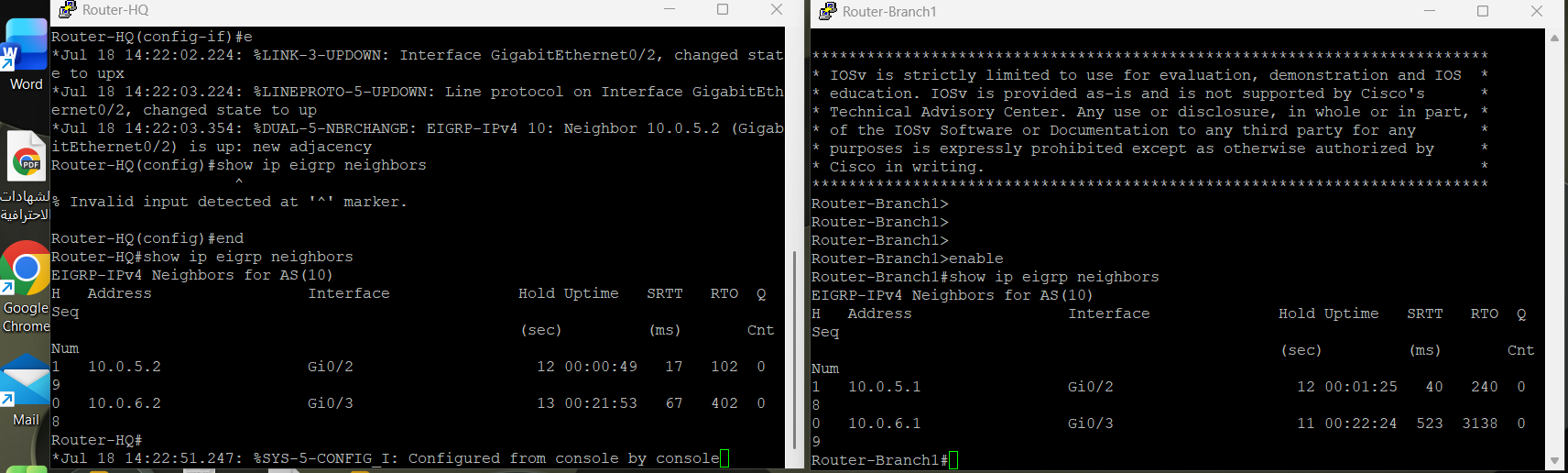
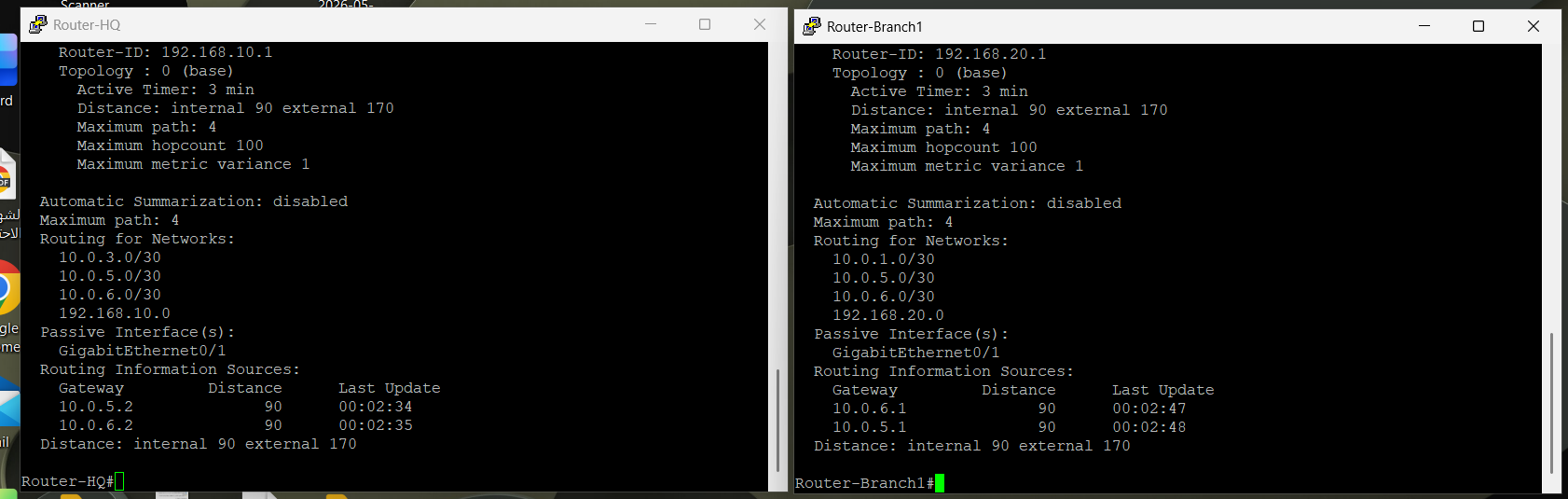
- EIGRP AS 10 on both Cisco routers across the two WAN links (10.0.5.0/30 and 10.0.6.0/30).EIGRP AS 10 على راوتري Cisco عبر رابطي WAN (10.0.5.0/30 و10.0.6.0/30).
- LAN-facing interfaces set to passive so routing updates stay on the WAN.واجهات الشبكة الداخلية مضبوطة على passive لتبقى تحديثات التوجيه على WAN فقط.
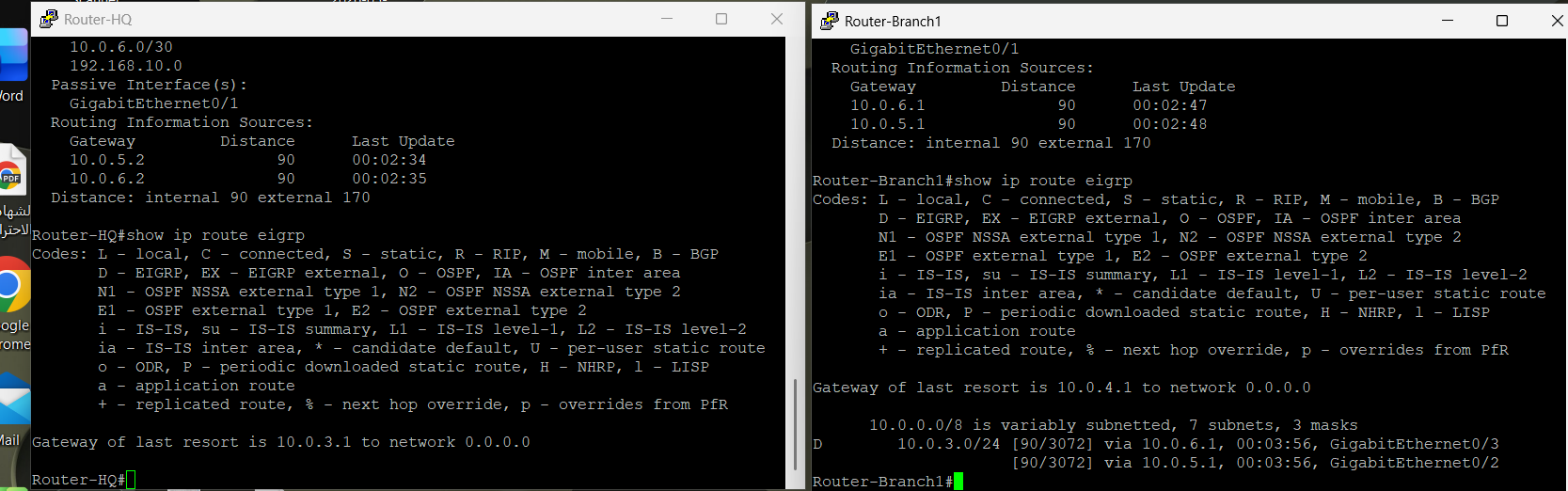
- Neighbour adjacency verified on both links, and the routing table shows equal-cost paths learned through EIGRP.تم التحقق من الجوار على الرابطين، ويُظهر جدول التوجيه مسارات متساوية التكلفة متعلَّمة عبر EIGRP.
FortiGate SD-WANFortiGate SD-WAN
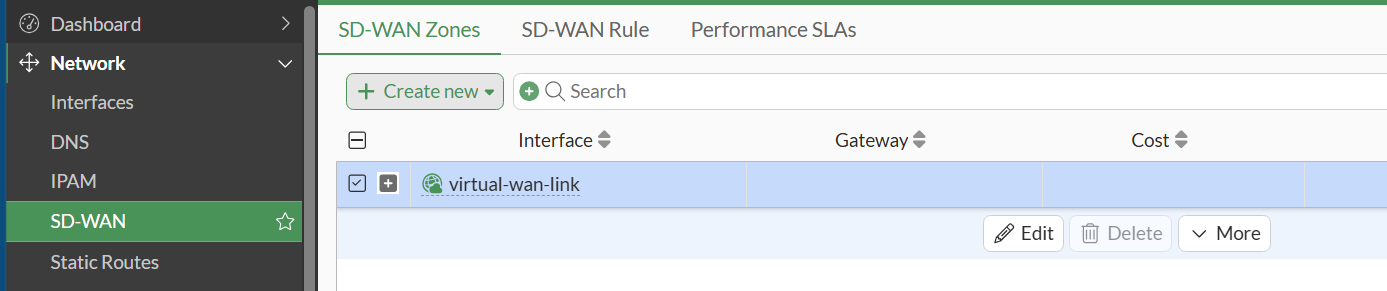
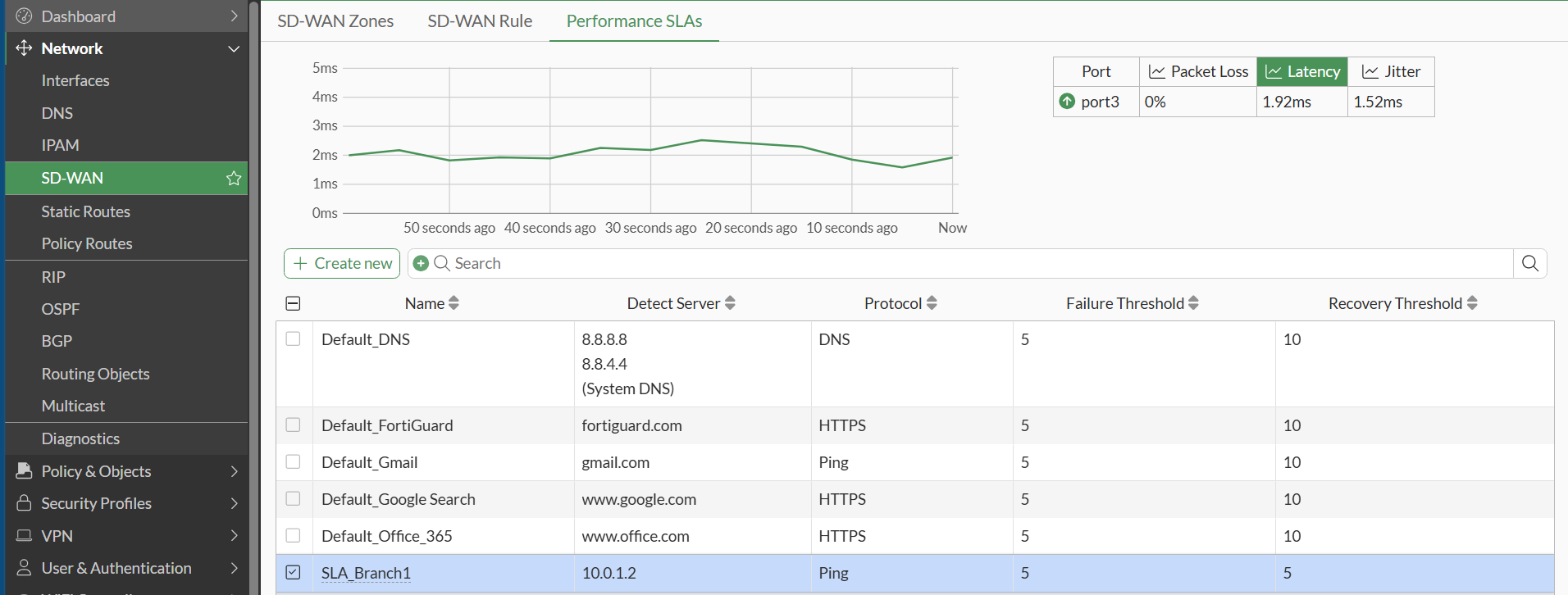
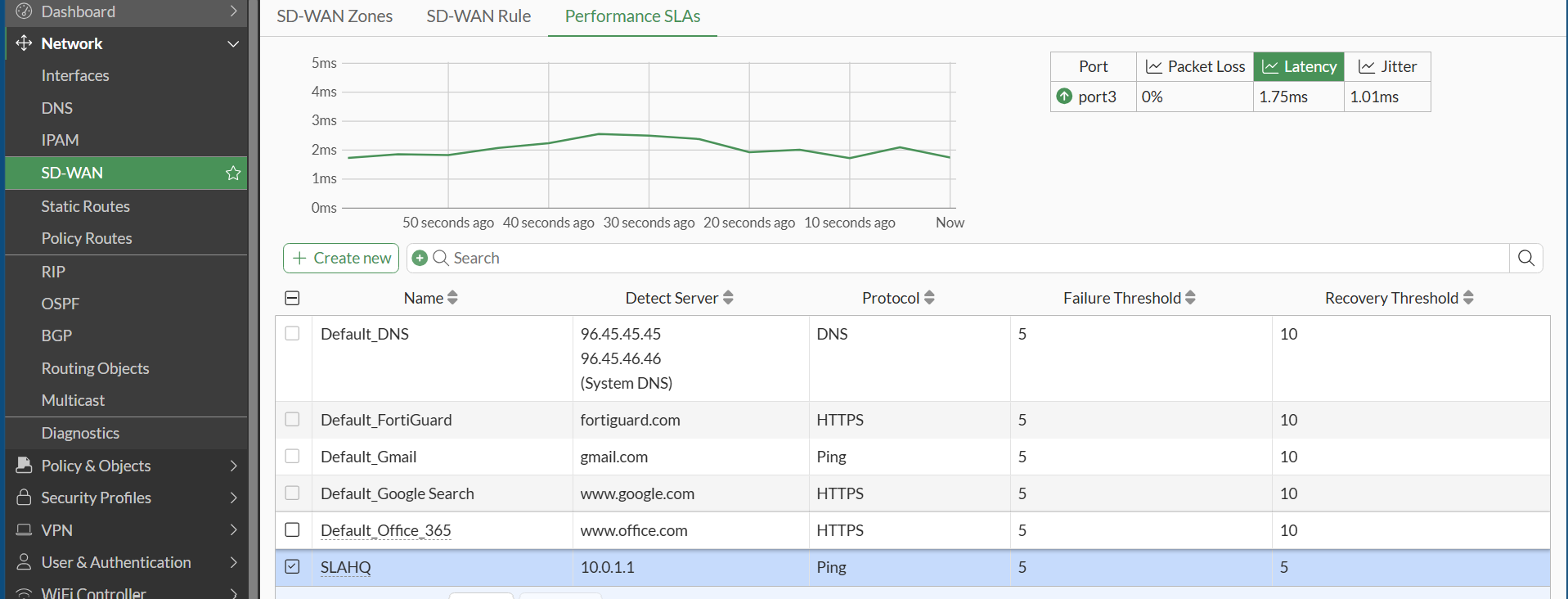
- An SD-WAN zone (virtual-wan-link) on both FortiGate units, using port3 as the member.منطقة SD-WAN (virtual-wan-link) على جهازي FortiGate، والعضو فيها port3.
- Performance SLA probes with ICMP ping (SLA_Branch1 at HQ, SLAHQ at the Branch), threshold 5/5.فحوصات Performance SLA بـICMP ping (SLA_Branch1 في المقر وSLAHQ في الفرع)، والحد 5/5.
- A latency-based SD-WAN rule chooses the path from the probe results.قاعدة SD-WAN مبنية على زمن الاستجابة تختار المسار من نتائج الفحص.
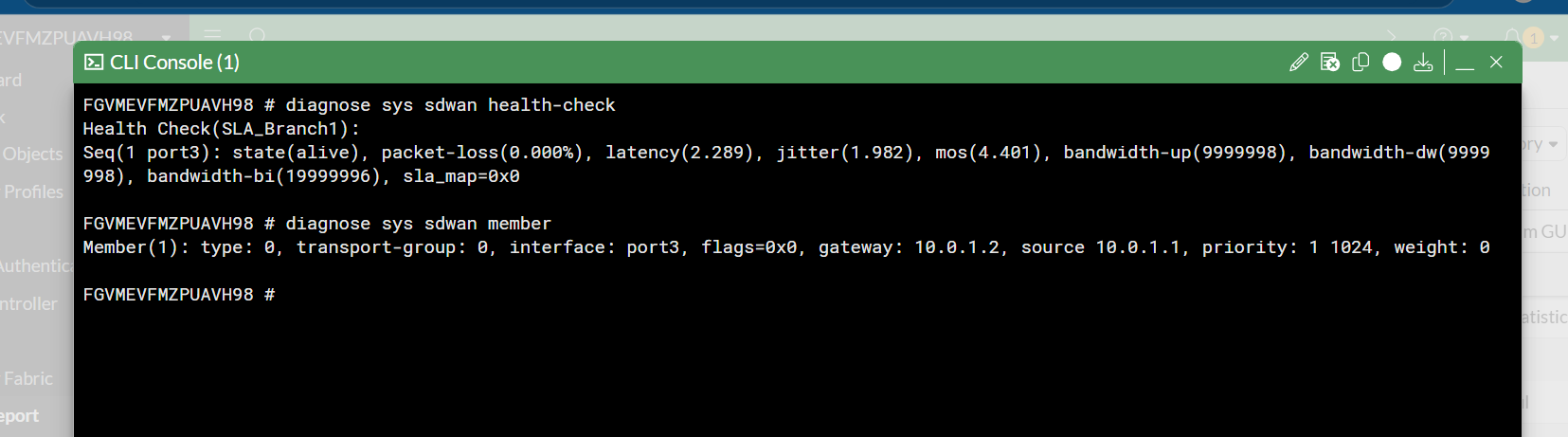
- CLI health check result: state alive, packet loss 0.000%, latency 2.289 ms, MOS 4.401.نتيجة فحص الصحة من CLI: الحالة alive، وفقدان الحزم 0.000%، وزمن الاستجابة 2.289 ms، وMOS 4.401.


Firewall policiesسياسات الجدار الناري
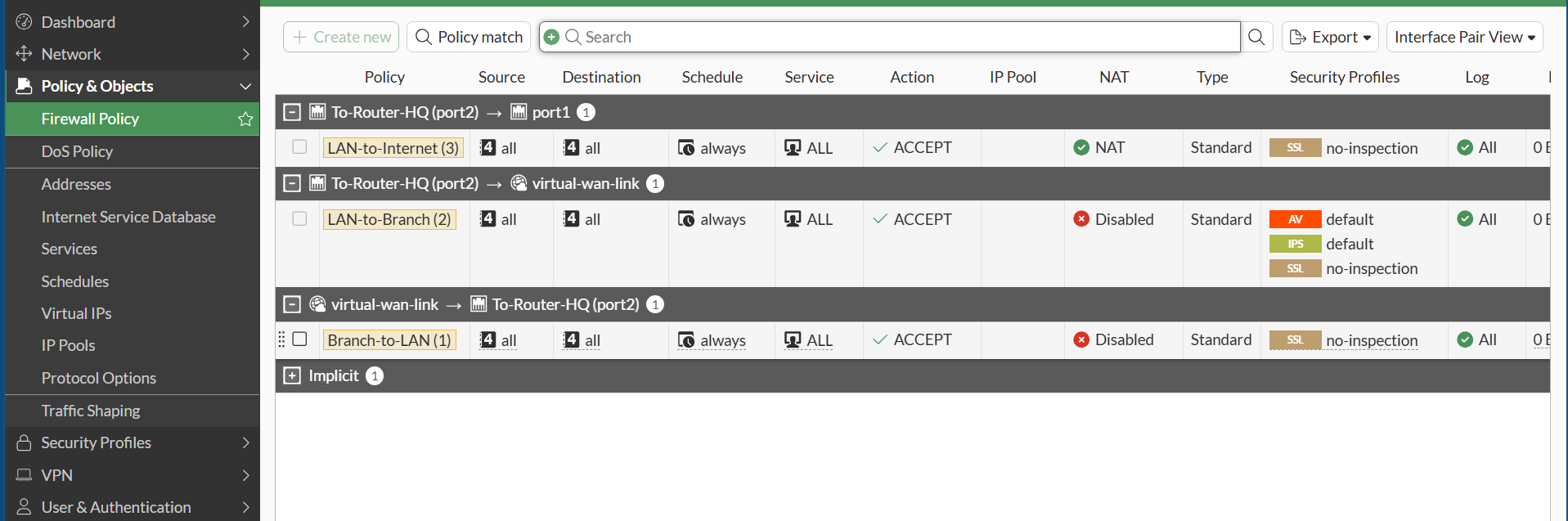
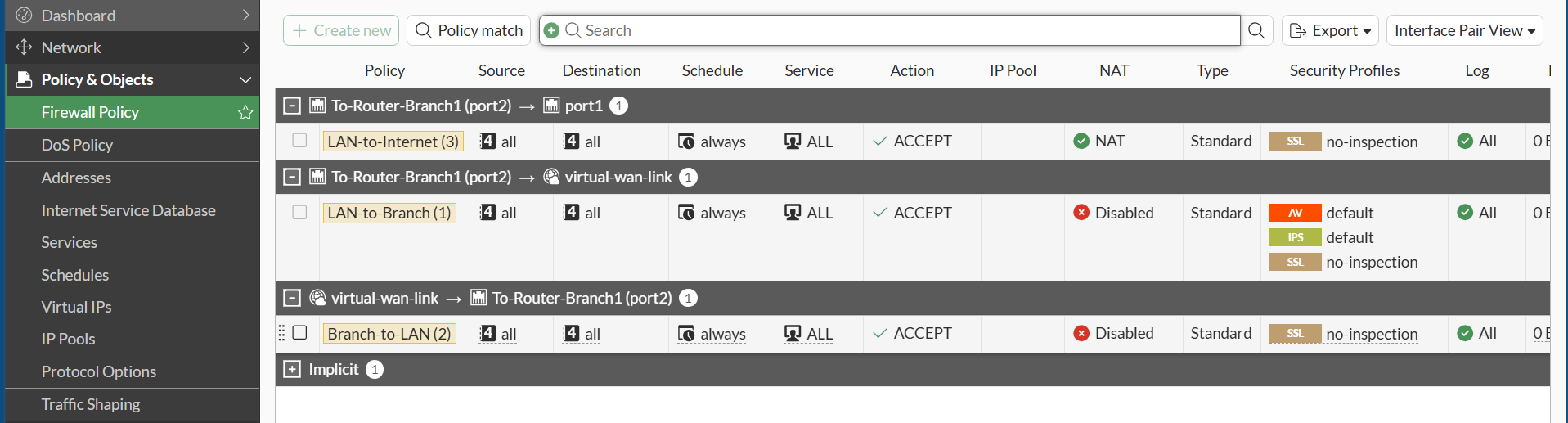
- LAN to Internet with NAT.من الشبكة الداخلية إلى الإنترنت مع NAT.
- LAN to Branch with the default antivirus and IPS profiles applied.من الشبكة الداخلية إلى الفرع مع ملفي مكافحة الفيروسات وIPS الافتراضيين.
- Branch to LAN return traffic, with SSL set to no-inspection.من الفرع إلى الشبكة الداخلية للمرور العائد، وSSL على no-inspection.
End-to-end test with iperf3اختبار من طرف لطرف بـiperf3
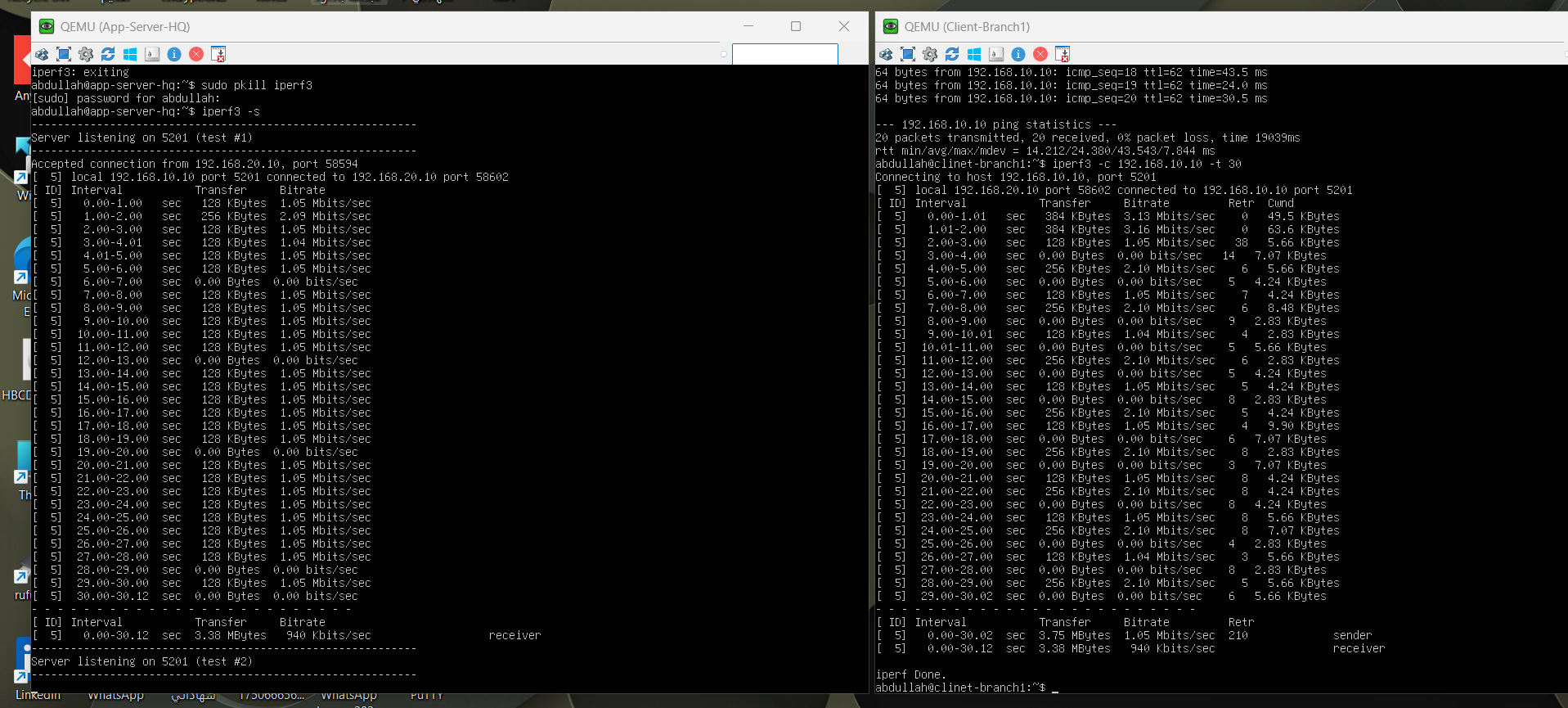
iperf3 ran between App-Server-HQ and Client-Branch1 across the full SD-WAN path: 3.38 MB transferred in 30 seconds with 0% packet loss on ping. In a nested virtual lab this confirms the path works end to end; it is a connectivity check, not a throughput benchmark.شُغّل iperf3 بين App-Server-HQ وClient-Branch1 عبر مسار SD-WAN كاملاً: نُقل 3.38 ميجابايت خلال 30 ثانية مع 0% فقدان حزم في ping. في مختبر افتراضي متداخل يؤكد هذا عمل المسار من طرف لطرف؛ هو فحص اتصال وليس قياساً لسرعة النقل.
What this project showsما يُظهره هذا المشروع
- Designing SD-WAN with SLA-based path selection on FortiGate.تصميم SD-WAN مع اختيار المسار بحسب SLA على FortiGate.
- Running EIGRP across redundant links with ECMP.تشغيل EIGRP عبر روابط احتياطية مع ECMP.
- Writing inter-site firewall policy with UTM profiles.كتابة سياسات الجدار الناري بين المواقع مع ملفات UTM.
- Proving a design with CLI evidence and traffic tests.إثبات التصميم بأدلة من CLI واختبارات مرور.
Want the details behind this project?تريد تفاصيل أكثر عن هذا المشروع؟
I’m happy to walk through the design, the configs and what I would change in production.يسعدني شرح التصميم والإعدادات وما الذي سأغيّره في بيئة الإنتاج.